

From Basic to Full-Stack: My React Native Journey Continues
Building a Form Builder App: Lessons from My Second React Native Project

previous article : https://peerlist.io/shivank100/articles/react-to-react-native
After my initial foray into React Native with a simple search/filter app and minimalist app, I've taken a significant leap forward by building a full-stack Form Builder application. This project has not only deepened my understanding of React Native but also introduced me to the complexities of building a production-ready mobile application.
The Project: Form Builder Mobile App
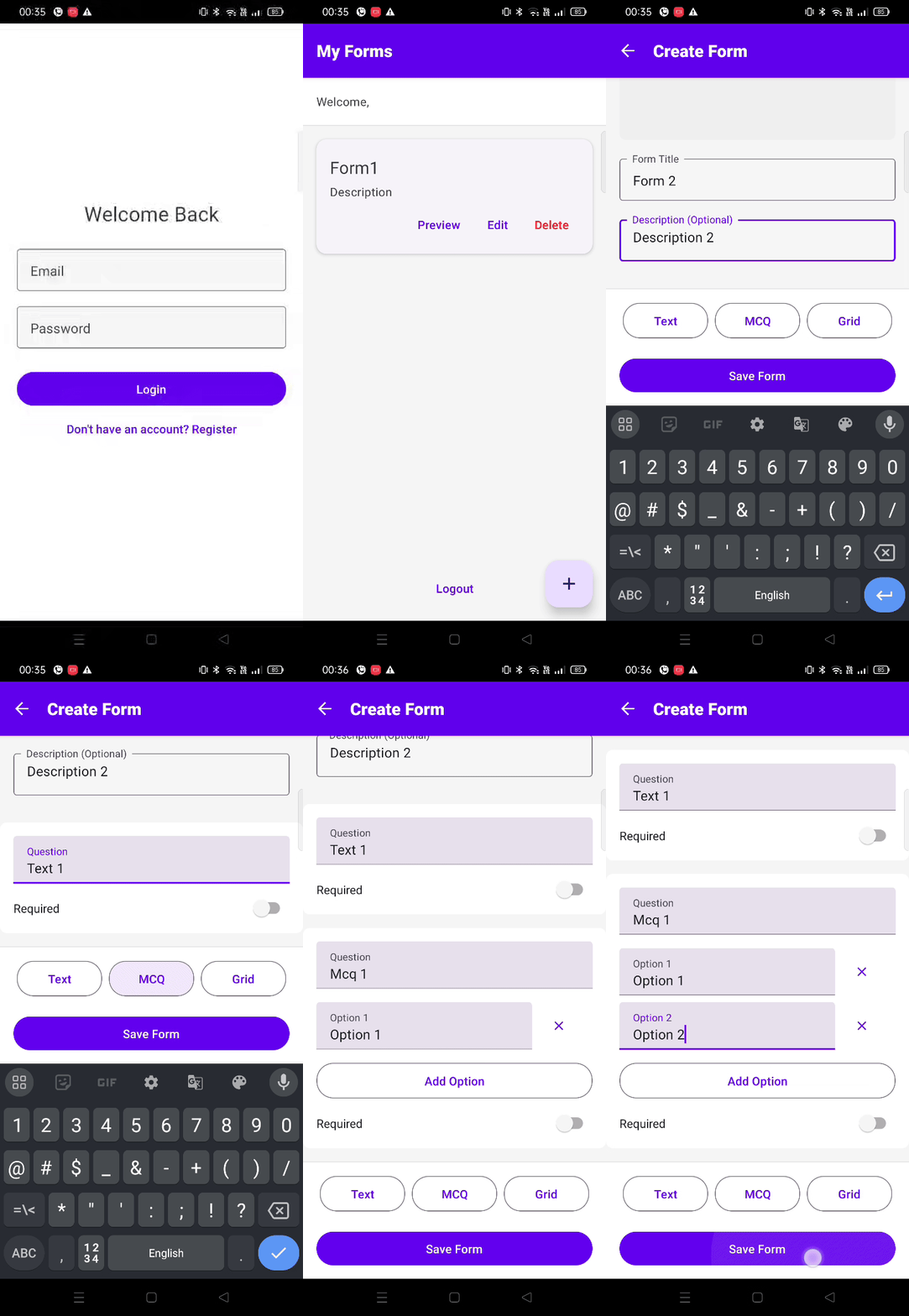
My second React Native project is a comprehensive form builder that allows users to create, manage, and collect responses to custom forms. Think of it as a mobile-first Google Forms alternative. The app supports multiple question types (Text, Checkbox, and Grid), image uploads, and response collection.
Key Technical Learnings
1. Authentication & State Management
Unlike my first project, this one required user authentication. I learned to:
- Implement JWT-based authentication
- Use AsyncStorage for persistent login
- Handle secure token management
- Manage global auth state
2. Navigation Evolution
From my basic understanding of navigation, I progressed to:
const Stack = createStackNavigator();

export default function AppNavigator() {

  return (

    <NavigationContainer>

      <Stack.Navigator>

        <Stack.Screen name="Auth" component={AuthScreen} />

        <Stack.Screen name="Home" component={HomeScreen} />

        {/* More screens */}

      </Stack.Navigator>

    </NavigationContainer>

  );

}
3. UI Component Libraries
While my first project used basic styling, this one leveraged React Native Paper:
- Pre-built components saved development time
- Consistent theming across the app
- Better user experience with material design
4. Backend Integration
The biggest leap from my first project was building a full backend:
- Express.js server with TypeScript
- MongoDB for data persistence
- RESTful API design
- Proper error handling
Challenges & Solutions
1. Image Handling: Unlike web, mobile image handling required special consideration:
const selectImage = async () => {

  const result = await ImagePicker.launchImageLibrary({

    mediaType: 'photo',

    quality: 0.8,

  });

 //rest of my code

};
2. Form State Management: Complex form state required careful planning:
const [form, setForm] = useState({

  title: '',

  questions: [],

  responses: [],

});
3. Response Collection: Implementing real-time form submission and response collection was challenging but rewarding.
Technical Growth
Comparing this project to my first React Native app shows significant progress:
First Project:
- Basic UI components
- Single screen
- Local state management
- No backend integration
Current Project:
- Complex UI with multiple question types
- Multi-screen navigation
- Full authentication flow
- Backend API integration
- Image upload capability
- Response management
Key Takeaways
1. TypeScript Integration: Using TypeScript from the start made the codebase more maintainable:
interface Question {

  id: string;

  type: 'text' | 'checkbox' | 'grid';

  title: string;

  required: boolean;

}
2. Component Organization: Better structure for reusable components:
src/
├── components/
│ ├── FormBuilder/
│ └── common/
├── screens/
└── services/
3. API Integration: Learned to properly structure API calls and handle responses:
const api = axios.create({

  baseURL: API_URL,

  headers: {

    'Content-Type': 'application/json',

  },

});
Looking Forward
This project has given me confidence in building full-stack mobile applications. The jump from a simple search filter to a complete form builder with backend integration shows significant progress in my React Native journey.
Next steps include:
- Implementing link sharing feature
- Exploring native module integration
- Performance optimization
The transition from web to mobile development continues to be exciting, with each project bringing new challenges and learning opportunities. If you're on a similar journey, remember that complexity is best tackled one feature at a time.
Frontend github : https://github.com/shivankkunwar/formGenius-native2
backend : https://github.com/shivankkunwar/FormGenius-backend
Demo:
I'm actively seeking SDE 1 positions!
Check out my portfolio showcasing my projects and skills: https://portfolio-shivank.vercel.app.
If you know of any opportunities, please feel free to reach out or share!

Join shivank on Peerlist!
Join amazing folks like shivank and thousands of other builders on Peerlist.
2
6
1